
Effective October 19, 2026, all NACC passbook orders must be placed through our online ordering platform.
NACC’s passbook ordering platform allows colleges and campuses to order passbooks directly for their approved programs, with secure credit card payment and order tracking.
Access the Passbook Ordering Portal
New Users – Create an Account
Colleges and campuses must register for an account before placing their first order. Once your account has been reviewed and approved, you can begin ordering passbooks.
Existing Users – Order Passbooks
Once your account has been approved, log in to the ordering platform to select your passbooks, confirm quantities, and complete your purchase by credit card.
Important: If your college operates multiple campuses, each campus must register for a separate account to ensure orders are processed and shipped to the correct location.
How to Order Passbooks
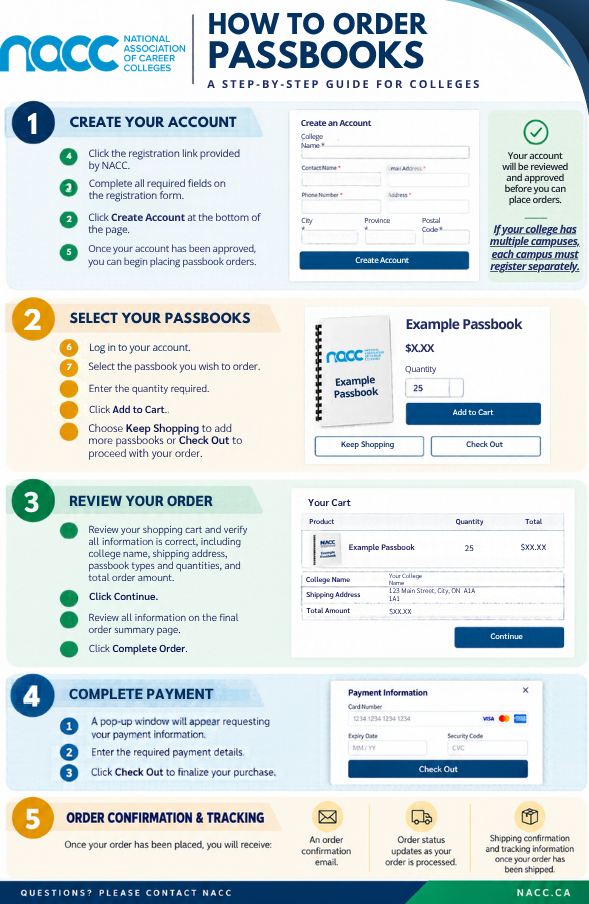
The ordering process consists of five simple steps:
- Create your account: Register your college or campus and wait for account approval.
- Select your passbooks: Log in, select the required passbooks and quantities, and add them to your cart.
- Review your order: Confirm your campus information, shipping address, passbook selections, quantities, and total amount.
- Complete payment: Enter your credit card information to finalize your purchase.
- Receive confirmation and tracking: You will receive an order confirmation email, order status updates, and shipping information once your order has been dispatched.
For detailed instructions, please refer to the following resources:
- How to Order Passbooks – Quick Reference Guide (PNG) – A visual overview of the ordering process.
- Passbook Self-Ordering Guide (PDF) – Detailed step-by-step instructions for account registration, ordering, payment, and tracking.
Important Ordering Information
As of October 19, 2026, all passbook orders must be submitted through the online ordering platform. NACC will no longer accept or process passbook orders through other methods.
Colleges are encouraged to ensure that each campus requiring passbooks has registered for an account.
Questions?
For questions or assistance with the passbook ordering process, please contact passbooks@nacc.ca.